Intro.
In Parts 1 through 3, we built a complete data pipeline and intelligence layer — real-time CDC from Cloud SQL, RFM feature engineering via Dataform, Random Forest ML prediction on Vertex AI, and RAG-grounded personalized offer generation via Gemini API. By the end of Part 3, campaign.offer contained 30 fully personalized campaign offers, each with a recommended product, segment classification, and assigned discount rate.
In Part 4, we close the loop. Visualizing campaign results on a Looker Studio dashboard connected directly to BigQuery, and completing the autonomous agent by having Gemini automatically generate full HTML email content — subject line, offer body, product description with marketing rewrite, and CTA — delivered to customers via SendGrid. From ML prediction to inbox delivery, zero manual work.
0. Closing the Loop — Complete Autonomous Agent
The diagram below shows the complete Walsh Retail Autonomous Marketing Agent across all four parts. Part 4 adds the final two components: a Looker Studio BI dashboard for campaign visibility, and an AI-powered email delivery system where Gemini generates the full HTML email content automatically.

Figure 0. Walsh Retail Autonomous Marketing Agent — complete architecture, Parts 1–4
1. Why Complete the Agent?
An AI system that stops at offer generation is a recommendation engine, not an agent. The defining characteristic of an autonomous agent is that it takes action — not just produces output for a human to act on. The offer text sitting in campaign.offer has no effect until it reaches the customer. Completing the delivery loop is what makes the system autonomous.
The comparison below shows what this means in practice. Traditional marketing campaigns require analyst time, copywriting, design, approval cycles, and manual send operations — typically spanning three to five days. The Walsh Retail AI Agent compresses the entire workflow to under ten minutes, with no human involvement after the initial campaign trigger.
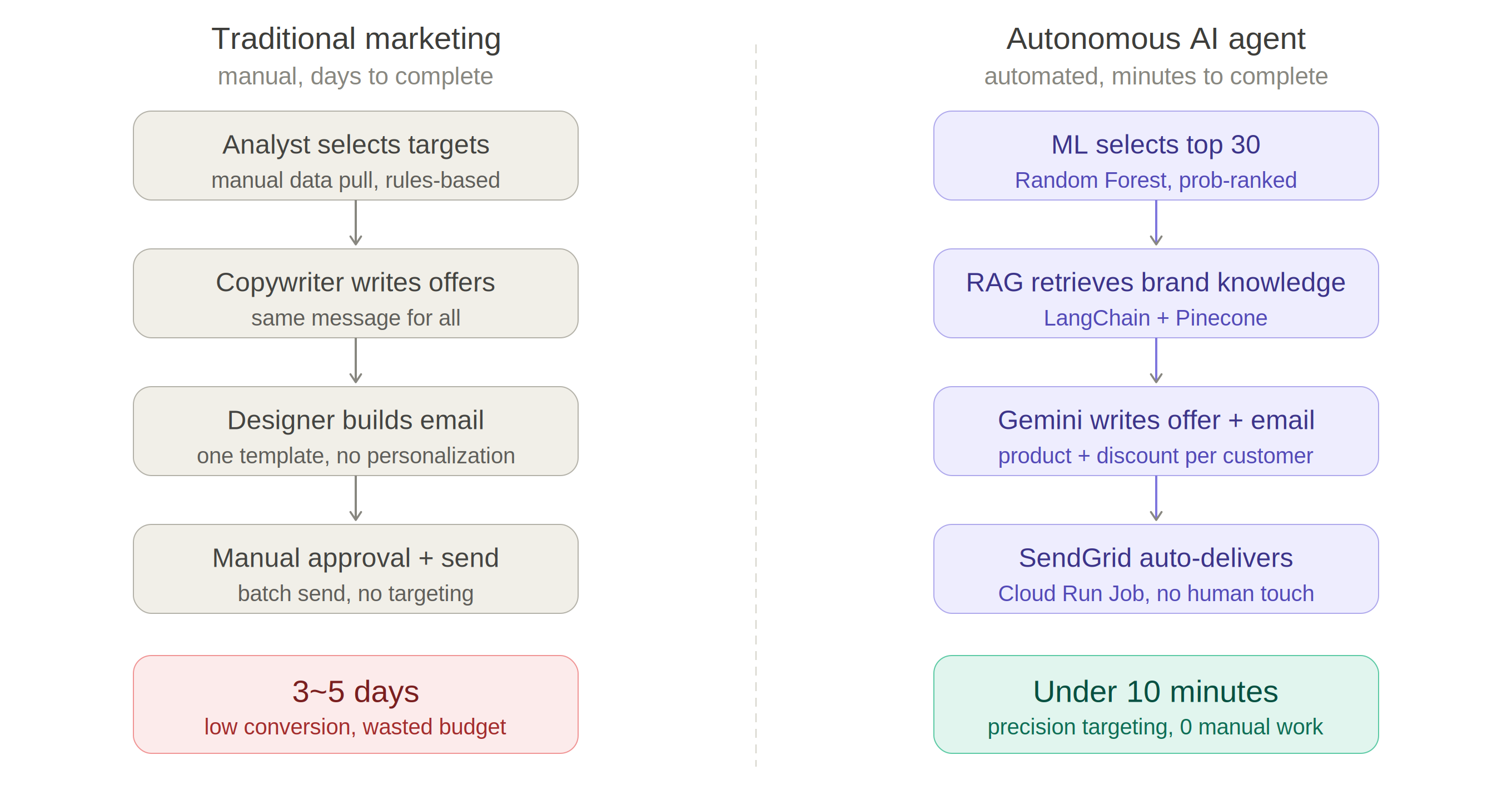
Figure 1.1. Traditional marketing (days, manual) vs Autonomous AI Agent (minutes, zero manual work)
2. Looker Studio Dashboard — Campaign Results
2.1 Why Looker Studio?
Looker Studio was selected as the BI layer for three reasons. First, it connects natively to BigQuery — no CSV export, no ETL step, no intermediate data layer. The dashboard reads directly from campaign.offer and mart.ml_prediction and refreshes automatically when the underlying data changes. Second, it is part of the GCP ecosystem, keeping the entire stack on a single cloud platform. Third, it is free — enterprise-grade dashboarding with no licensing cost, which matters for a portfolio project that needs to remain cost-efficient.
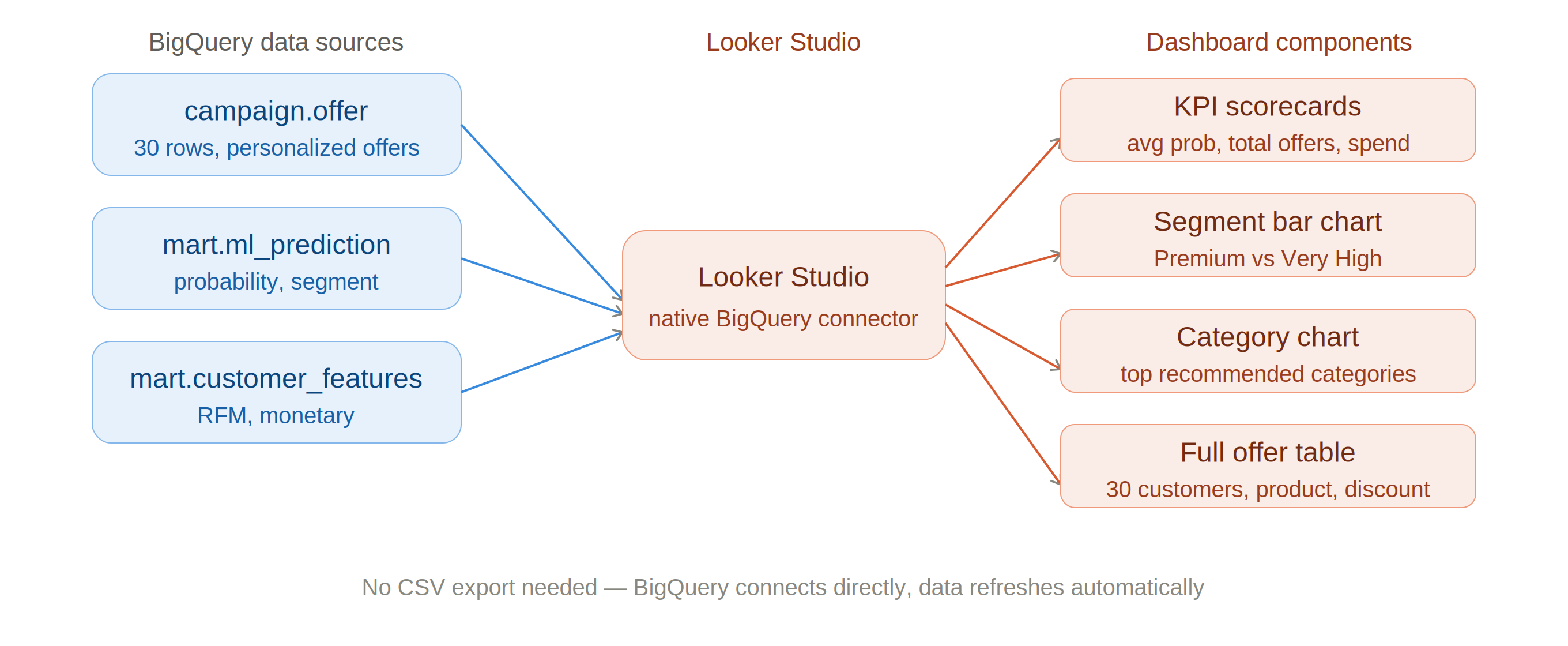
Figure 2.1. Looker Studio — direct BigQuery connector, no CSV export required
2.2 Dashboard Setup
The report connects two BigQuery tables as separate data sources: mart.ml_prediction for ML prediction results, and campaign.offer for the 30 personalized offer outputs. This two-source approach allows the dashboard to tell the full story — from model scoring to campaign delivery — without requiring a JOIN or data blending step.
Navigation: datastudio.google.com > Create > Report > Add data > BigQuery > isupernova-ai > mart > ml_prediction > Add. Then: Add data > BigQuery > isupernova-ai > campaign > offer > Add.
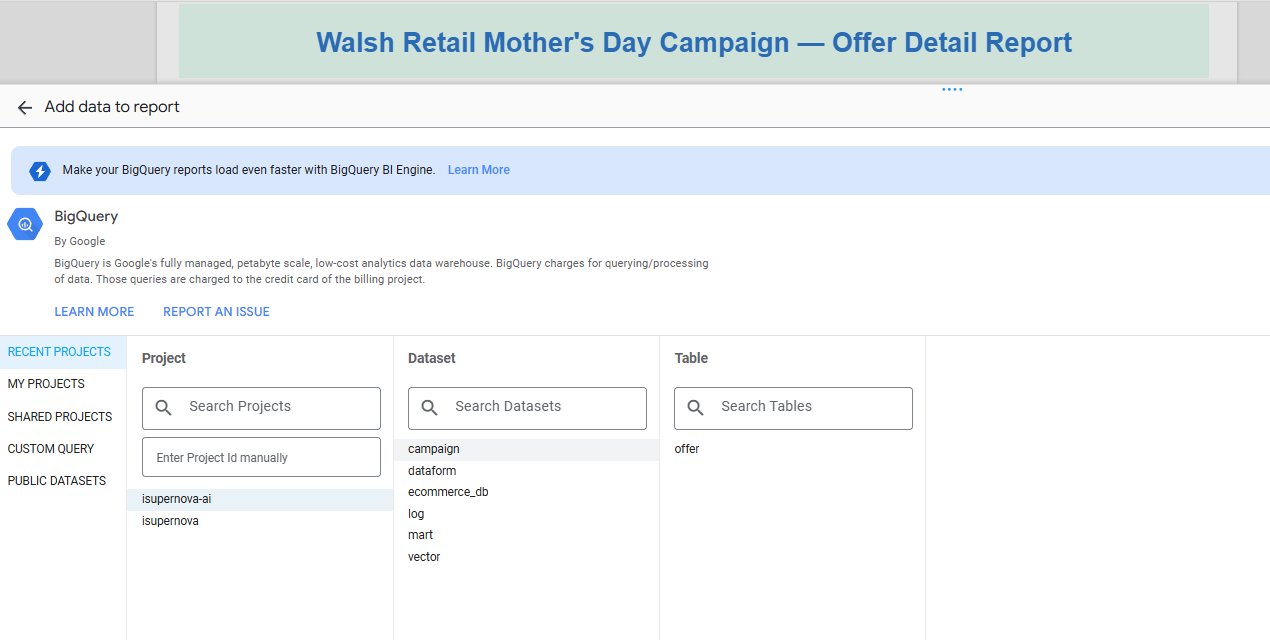
Figure 2.2. Looker Studio — BigQuery connector showing isupernova-ai project datasets
2.3 Dashboard — Page 1: Campaign Overview
The first page is built as a two-row layout. The top row contains four KPI scorecards that summarize the end-to-end campaign pipeline at a glance. The bottom row contains two charts placed side by side — a horizontal bar chart showing Order Amount by Category from the full customer base (left), and a pie chart showing the Offers Category Ratio among the 30 target customers by favorite brand (right).
| Scorecard | Data source | Value |
|---|---|---|
| Total Customers | ecommerce_db.customer | 200 |
| Target Customers | campaign.offer | 30 |
| Avg Probability | campaign.offer | 0.986 |
| Offers Generated | campaign.offer | 30 |
The Order Amount by Category bar chart confirms that Jewellery dominates Walsh Retail revenue at $224.3K — consistent with the IT 544 baseline result where Jewellery ranked first at $7,676. The Offers Category Ratio pie chart shows Karatcraft leading at 22.5%, followed by Candy House (14.1%) and Radiant Bay (10.3%) — reflecting the favorite brand distribution of the 30 ML-selected target customers.
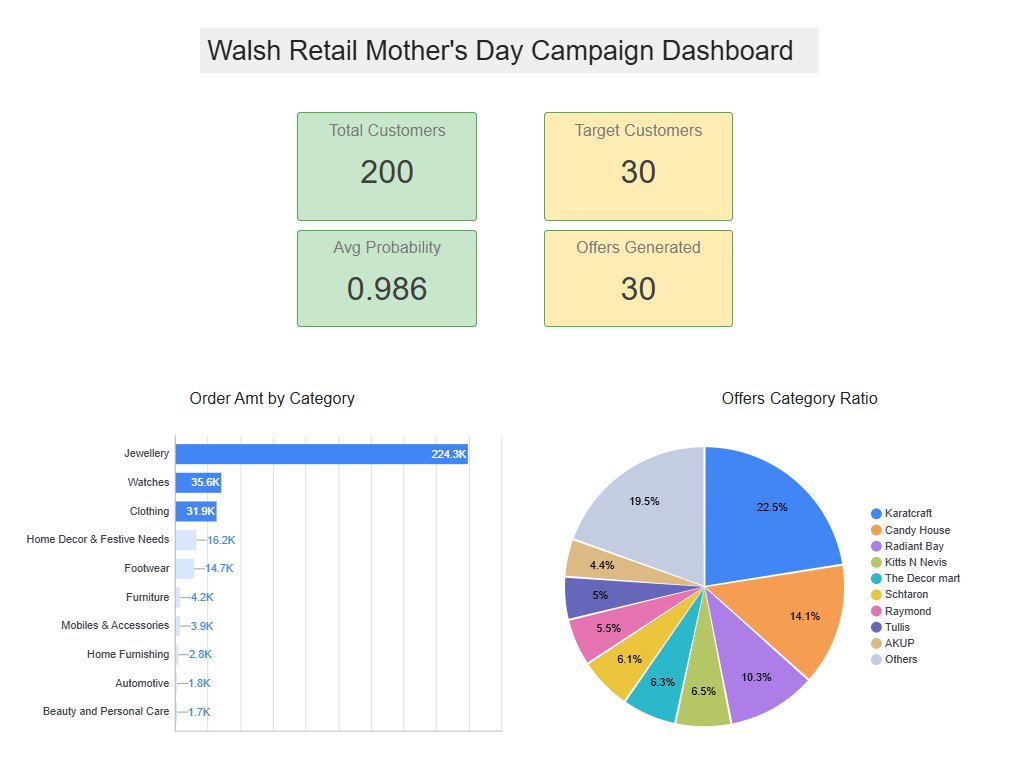
Figure 2.3. Looker Studio — Page 1: KPI scorecards + Order Amt by Category (left) + Offers Category Ratio by brand (right)
2.4 Dashboard — Page 2: Offer Detail Report
The second page contains the full offer detail table — all 30 target customers with their favorite brand, offer text preview, preferred category, discount rate, and recommended product. This page serves as the operational view for the marketing team, showing exactly what offer was generated for each customer.
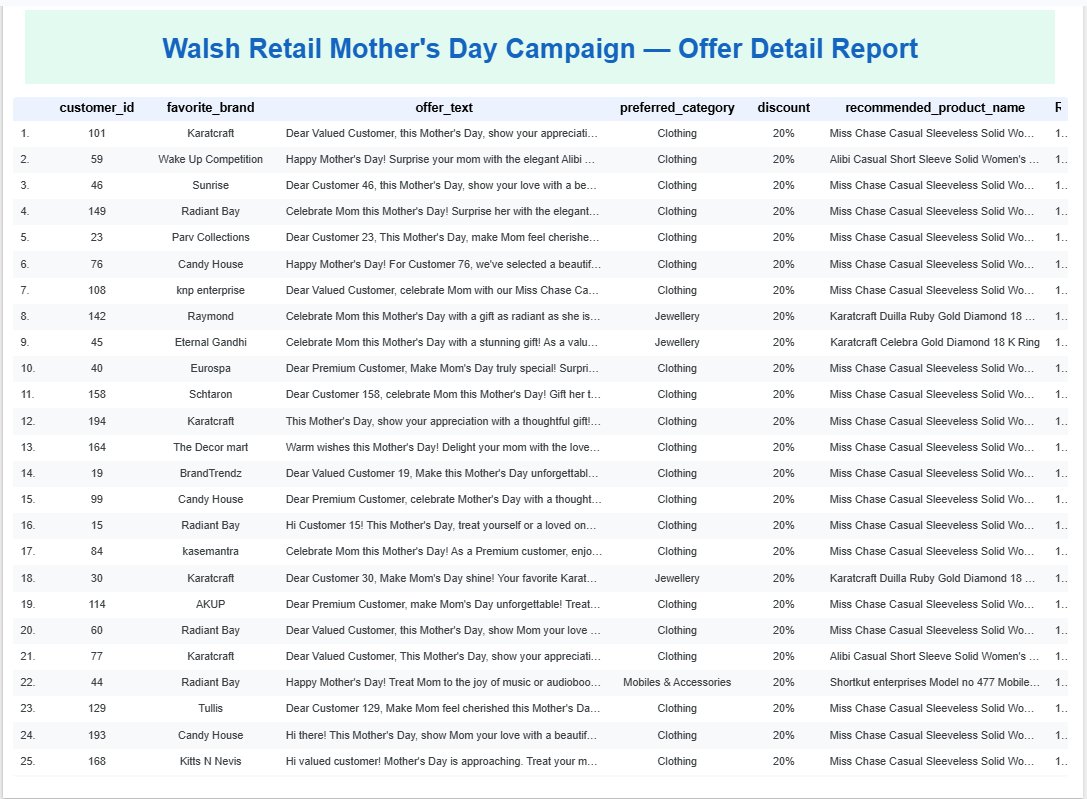
Figure 2.4. Looker Studio — Page 2: full offer detail table, 30 customers with product recommendation and offer preview
3. AI Agent in Action — Gemini Writes the Campaign
The personalized offer content generated in Part 3 is channel-agnostic. The same
campaign.offer data can power any outreach channel your marketing team uses:
- SMS / Text — short-form offer with discount code
- Outbound Call Script — personalized talking points for sales team
- Direct Mail (DM) — print-ready offer letter
- Web Promotion — personalized banner or landing page content
- Push Notification — mobile app offer trigger
In this post, we demonstrate email as a concrete example — showing how Gemini API generates a complete HTML email automatically for each target customer, delivered via SendGrid. The same pattern applies to any channel above with minimal code changes.
3.1 Why AI-Generated Email Content?
The standard approach in marketing automation is template-based email: a designer builds one HTML template, a copywriter writes one subject line, and the system merges customer names and discount codes into the blanks. The actual content — the product choice, the offer language, the emotional angle — is the same for everyone.
The Walsh Retail AI Agent takes a fundamentally different approach. For each target customer, Gemini receives their full profile — segment, favorite brand, preferred category, recommended product, and the offer text generated in Part 3 — and generates a complete, unique HTML email. The subject line references the customer's specific product. The product description section is a fresh marketing rewrite. The CTA button reflects the exact discount rate for that customer's segment. Every email is genuinely different.
3.2 Email Generation Pipeline
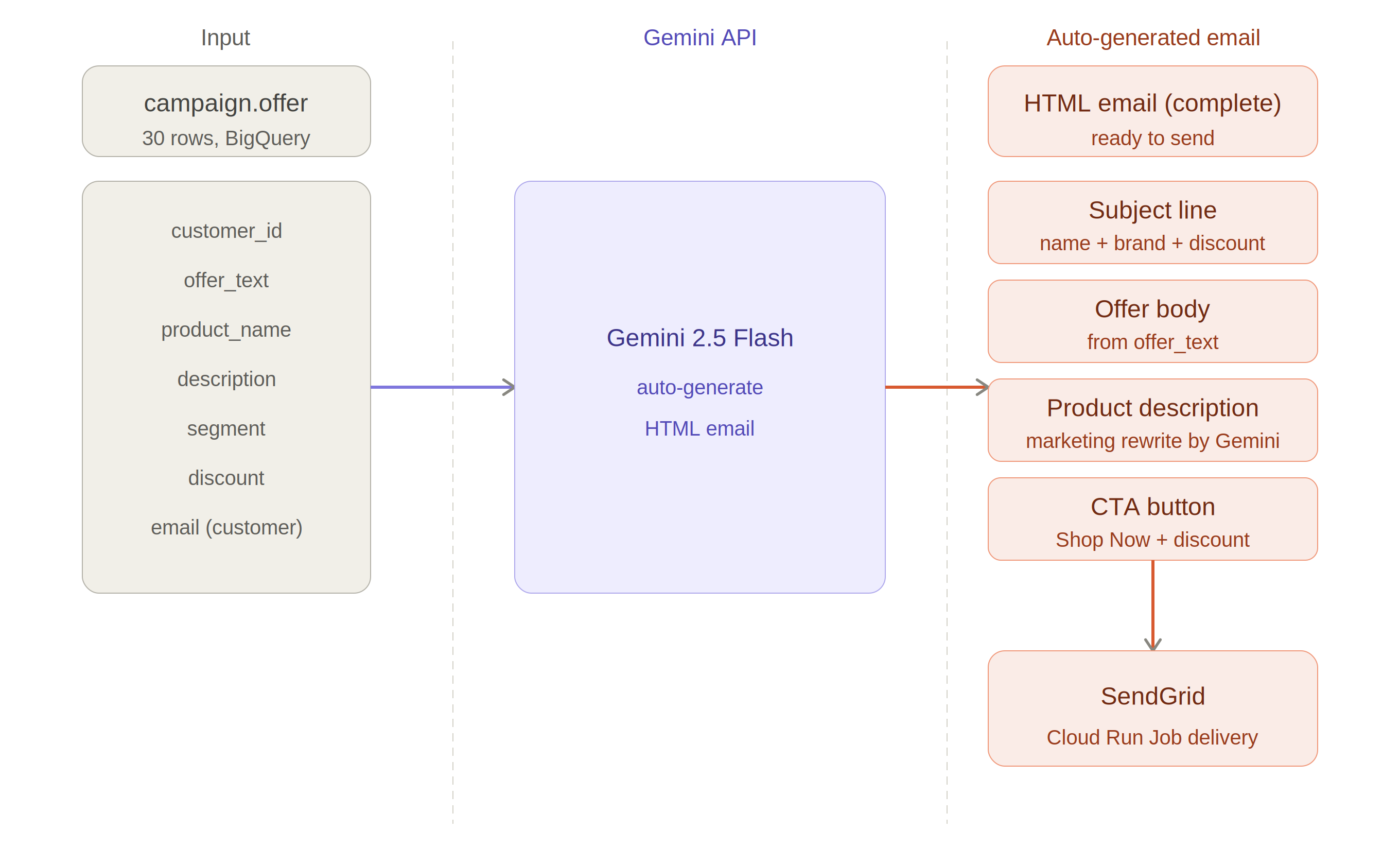
Figure 3.1. AI email generation pipeline — campaign.offer → Gemini → HTML email → SendGrid
3.3 Gemini Email Generation — Code
The generation runs in Vertex AI Colab Enterprise, reading from campaign.offer joined with the customer table to retrieve recipient email addresses and the product table for product descriptions. For each customer, a structured prompt is sent to Gemini with the complete customer context, and the response is a ready-to-send HTML email string.
from google.cloud import bigquery
from vertexai.generative_models import GenerativeModel
import vertexai, json, os
from sendgrid import SendGridAPIClient
from sendgrid.helpers.mail import Mail

# Initialize
vertexai.init(project="isupernova-ai", location="us-central1")
model = GenerativeModel("gemini-2.5-flash")
client = bigquery.Client(project="isupernova-ai", location="us-east4")

# Load offer data with customer email and product description
query = """
SELECT
    o.customer_id,
    c.Customer_Name,
    c.Email as recipient_email,
    o.favorite_brand,
    o.preferred_category,
    o.recommended_product_name,
    o.segment,
    o.discount,
    o.offer_text,
    SUBSTR(p.Description, 1, 300) as product_description
FROM `isupernova-ai.campaign.offer` o
JOIN `isupernova-ai.ecommerce_db.customer` c
    ON o.customer_id = c.Customer_ID
LEFT JOIN `isupernova-ai.ecommerce_db.product` p
    ON CAST(o.recommended_product_id AS INT64) = p.Product_ID
WHERE c.dml_flag != 'D'
ORDER BY o.probability DESC
"""
df_email = client.query(query).to_dataframe()

# Gemini email generation
def generate_email(row):
    prompt = f"""
You are a marketing specialist for Walsh Retail e-commerce store.
Generate a complete HTML email for a Mother's Day campaign.

Customer: {row['Customer_Name']}
Segment: {row['segment']}
Discount: {row['discount']}
Favorite Brand: {row['favorite_brand']}
Recommended Product: {row['recommended_product_name']}
Product Description: {row['product_description']}
Offer Message: {row['offer_text']}

Generate a complete HTML email with:
1. Subject line (include customer first name, product, discount)
2. Warm greeting using customer first name
3. Offer body (use the provided offer message)
4. Product section (rewrite description as marketing copy)
5. CTA button: "Shop Now — {row['discount']} Off"
6. Warm closing from Walsh Retail team

Return ONLY a JSON object with NO markdown, NO backticks:
{{"subject": "...", "html_body": "..."}}
"""
    response = model.generate_content(prompt)
    text = response.text.strip().replace("```json","").replace("```","")
    return json.loads(text)

# Generate + send for target customer
row = df_email.iloc[0]
result = generate_email(row)

# SendGrid delivery
message = Mail(
    from_email="isupernovaai@gmail.com",
    to_emails=row["recipient_email"],
    subject=result["subject"],
    html_content=result["html_body"]
)
sg = SendGridAPIClient(os.environ["SENDGRID_API_KEY"])
response = sg.client.mail.send.post(request_body=message.get())
print(f"Status: {response.status_code}")  # 202 = Success
3.4 Generated Email Preview
The output below shows the actual HTML email rendered in Colab for Customer 101 (Amy Gutierrez) — a Premium segment customer whose favorite brand is Karatcraft and preferred category is Clothing. Gemini generated the complete HTML including subject line, personalized greeting, offer body, product section with marketing rewrite, discount calculation, and CTA button.
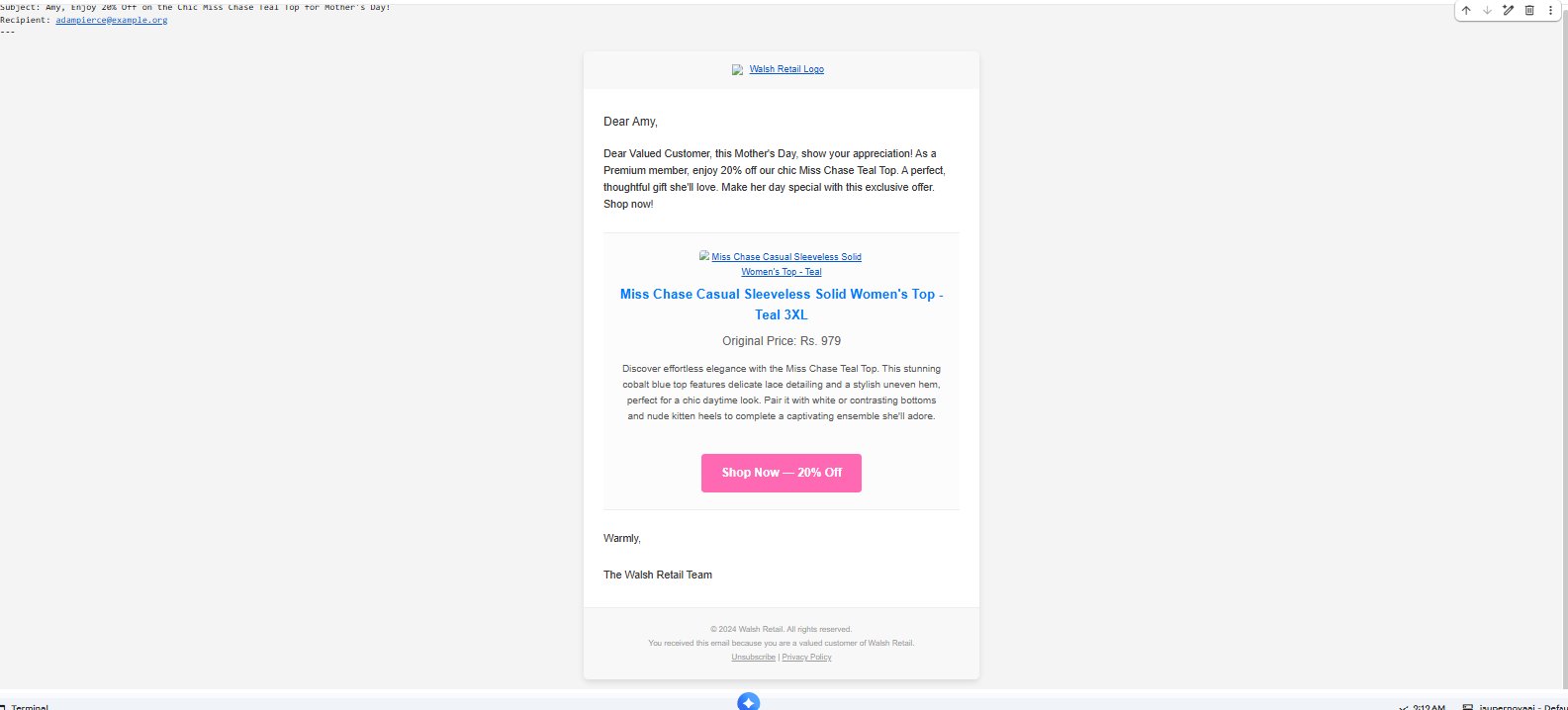
Figure 3.2. Gemini-generated HTML email rendered in Colab — subject, offer body, product section, and CTA auto-completed
4. SendGrid Delivery — Email in the Inbox
SendGrid is the industry standard for transactional email delivery, used by companies including Netflix, Uber, and Airbnb. The Python SDK provides a clean API for sending HTML emails programmatically, making it the natural delivery layer for the Walsh Retail AI Agent. The free tier allows 100 emails per day — sufficient for this demonstration.
The Colab notebook sends the generated email via the SendGrid API and returns HTTP status 202, confirming successful delivery to SendGrid's servers.
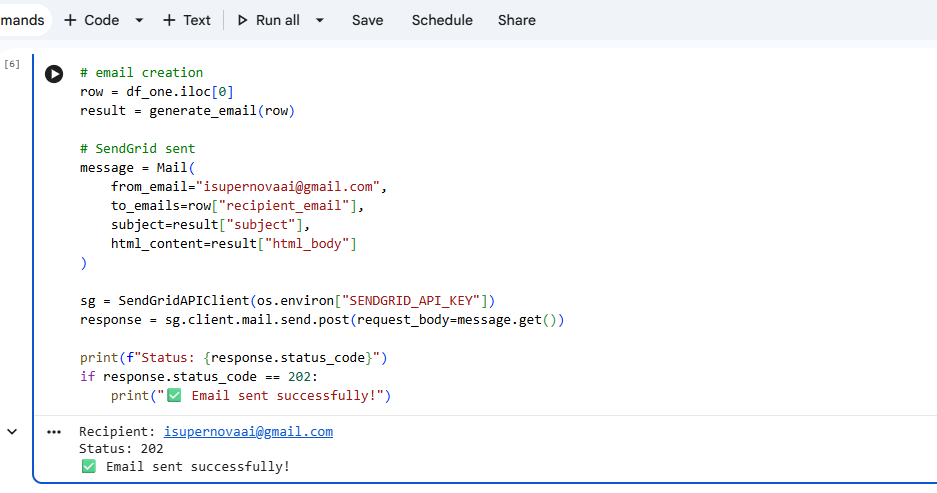
Figure 4.1. Colab — SendGrid delivery confirmed, HTTP status 202
The email arrives in the recipient's inbox with the AI-generated subject line, personalized content, and the Walsh Retail branding intact. The complete pipeline — from BigQuery data retrieval through Gemini content generation to SendGrid delivery — runs entirely in Python with no manual steps.
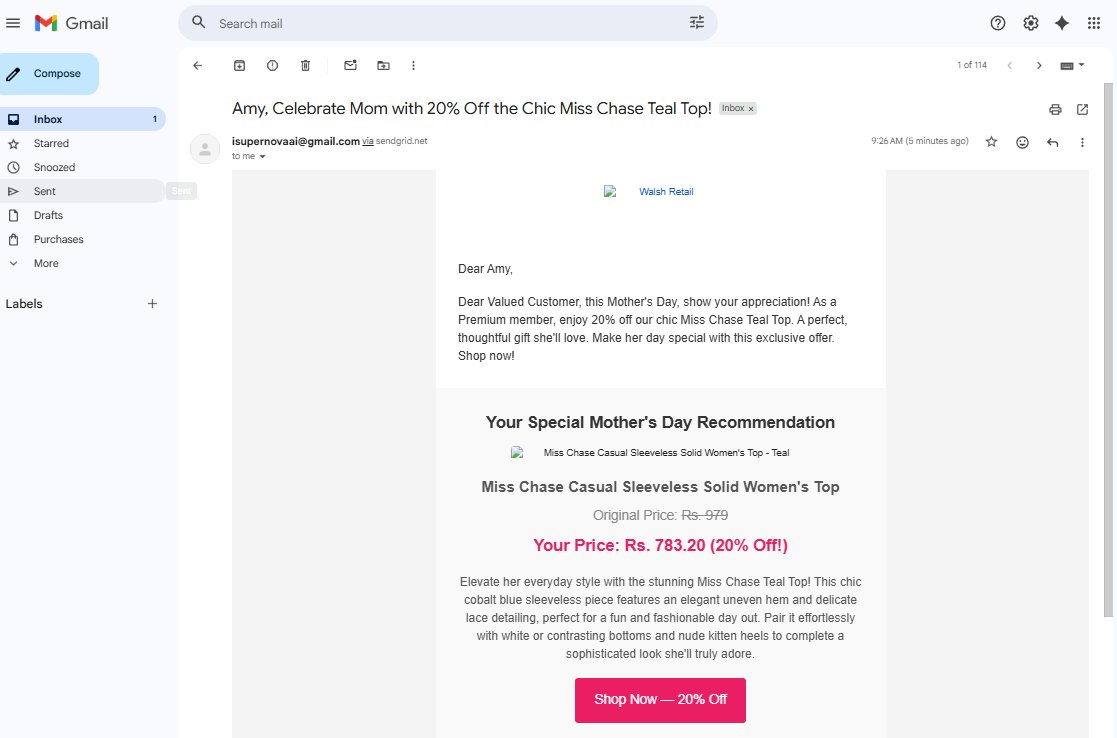
Figure 4.2. Gmail inbox — Walsh Retail Mother's Day campaign email delivered, AI-generated subject and content confirmed
In this demonstration, the email generation and delivery pipeline runs in a Colab notebook. In production, the same Python code would be containerized as a Docker image and deployed as a Cloud Run Job — triggered automatically by Cloud Workflows as the final step of the daily campaign pipeline. The code requires no changes; only the execution environment changes from notebook to container.
4.3 Email Delivery History — BigQuery
In production, every email send event must be logged for campaign analysis, compliance, and re-engagement tracking. The Walsh Retail Agent stores all delivery records in two separate BigQuery tables, following standard CRM data architecture: campaign.email_log for delivery status tracking, and campaign.email_content for the full HTML content history.
| Table | Purpose | Key fields |
|---|---|---|
campaign.email_log |
Delivery history, campaign effectiveness analysis | customer_id, send_status, sent_at, opened_at, clicked_at |
campaign.email_content |
HTML content archive, re-send, version control | customer_id, subject, html_body, generated_at |
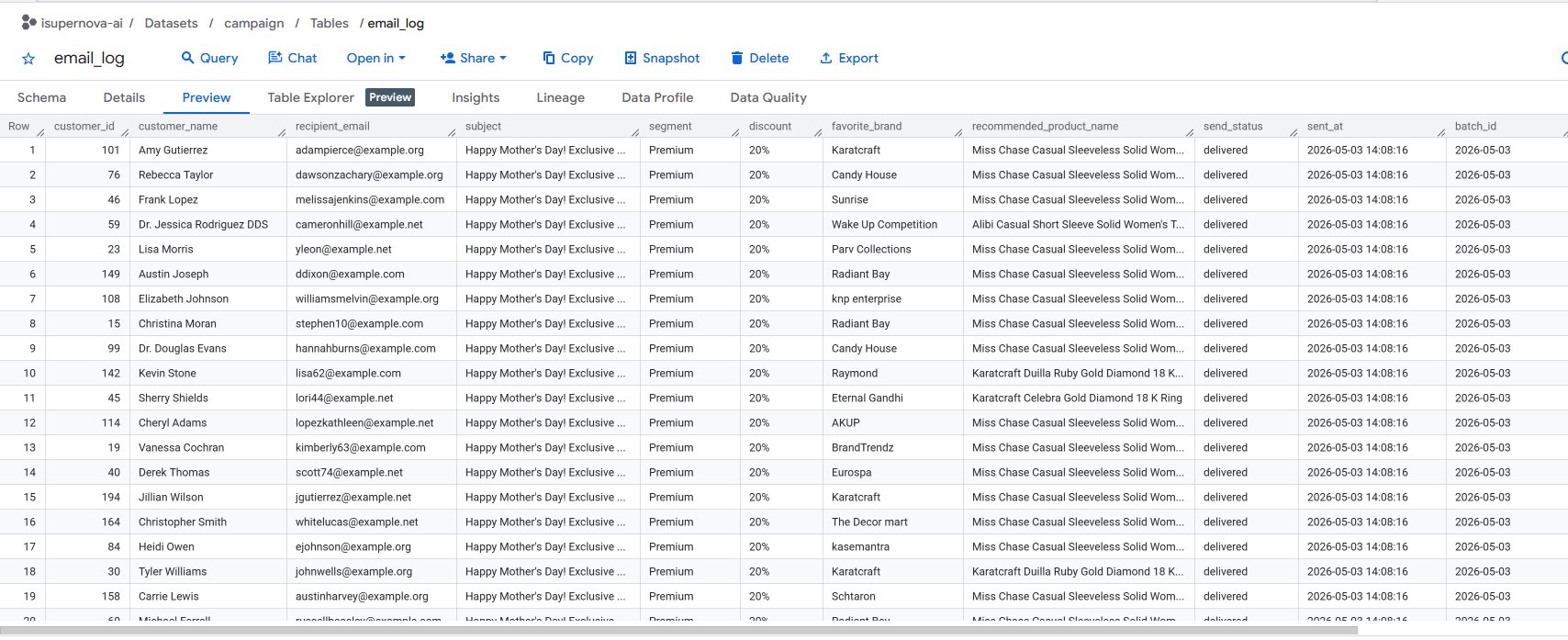
Figure 4.3. BigQuery campaign.email_log — 30 customers, all delivered, sent_at and batch_id recorded
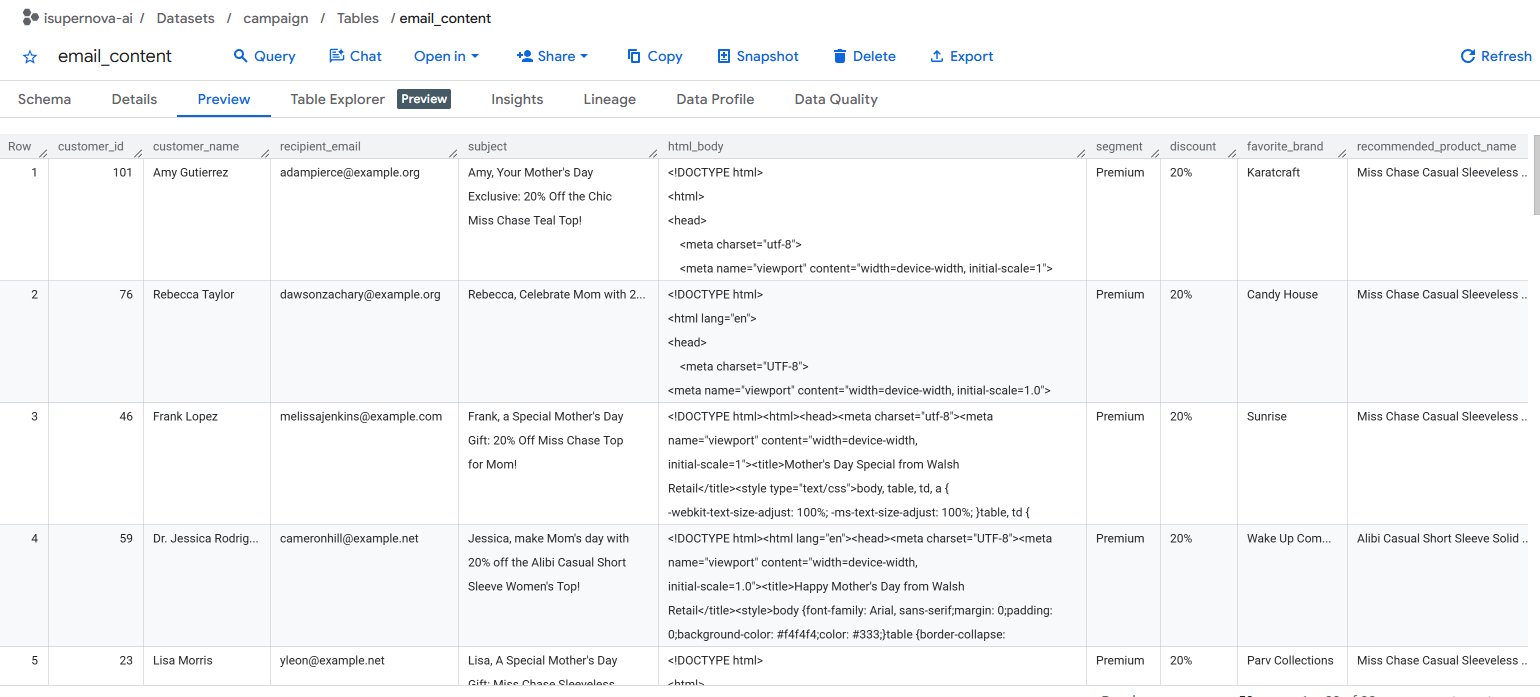
Figure 4.4. BigQuery campaign.email_content — full HTML body stored per customer, subject line personalized for each recipient
5. Series Wrap-up — What We Built
Across four posts, we built a complete Autonomous Marketing Agent on GCP from scratch — a system that selects high-value customers, generates personalized campaign offers grounded in real brand knowledge, and delivers them to customer inboxes without any human involvement.
| Part | What we built | GCP services |
|---|---|---|
| Part 1 | GCP infra setup, stage_db ERD (3NF), BigQuery ai_agent_db schema, initial data load | Cloud SQL, BigQuery, DBeaver, Faker, Kaggle Flipkart dataset |
| Part 2 | Real-time CDC pipeline, RFM feature engineering, daily orchestration | Datastream, Dataform, Cloud Workflows, Cloud Scheduler |
| Part 3 | Random Forest ML prediction, RAG pipeline, personalized offer generation | Vertex AI Colab Enterprise, Pinecone, LangChain, Gemini API |
| Part 4 | BI dashboard, AI-powered HTML email generation, SendGrid delivery | Looker Studio, Gemini API, SendGrid, Cloud Run |
5.1 What Makes This an Autonomous Agent
The term "agent" is overused in 2026. What makes the Walsh Retail system genuinely autonomous is the absence of human decision points in the operational loop. The system does not surface recommendations for a human to approve — it selects customers, generates content, and delivers messages. The only human involvement is in the initial design of the system and the definition of business rules. Everything else runs automatically.
This demonstration runs on a 200-customer dataset with synthetic orders. Scaling to production would require: replacing synthetic brand reviews with real vendor catalog data for the RAG knowledge base, adding A/B testing for offer messaging, integrating delivery analytics (open rates, click-through) back into BigQuery for model feedback, and scheduling the full pipeline via Cloud Workflows rather than running Colab notebooks manually. The architecture is production-ready — the data volume and integration points are the remaining gaps.
What makes this system an Autonomous AI Agent is not any single component — it is the absence of human decision points in the operational loop. The agent perceives data, reasons about targets, generates content, and takes action. No analyst selected these customers. No copywriter wrote these emails. No designer built these templates. The system did all of it, end to end, autonomously.
This concludes the Walsh Retail series. It has been a rewarding journey building a production-grade AI Agent from scratch on GCP — from database design through real-time pipelines, machine learning, RAG, and automated delivery.
The next series will explore a completely different domain. Stay tuned.
Full series:
Part 1 — Project Design & Architecture
Part 2 — Data Pipeline: CDC, ETL & Orchestration
Part 3 — Vertex AI Random Forest, RAG, LangChain, Pinecone & Gemini API
Part 4 — BI Dashboard & AI-Powered Email Delivery
The sample data and source code for this project are available upon request. Feel free to reach out via the contact page.