Intro.
If you've been following this blog, you know we started by building this very website — a production-ready tech blog running on GCP with Wagtail CMS, Cloud Run, and Cloud SQL. That was our foundation.
Now it's time to build something on top of it. Starting with this post, we're going on a new journey: building an Autonomous AI Agent from scratch on Google Cloud Platform. The goal is hands-on and practical — not just reading about AI trends, but actually implementing the tools and architectures that real companies are adopting right now.
Walsh Retail is a fictional company created solely for the purpose of this project. All data — including customer records, order histories, and product information — is synthetically generated fake data and does not represent any real individuals, transactions, or businesses. This project was designed with full compliance with data privacy regulations.
If you wish to reproduce, distribute, or republish any part of this content elsewhere, you must credit the original source with a link back to isupernova.io. Unauthorized redistribution without proper attribution is not permitted. The author assumes no legal liability for any misuse of the concepts, code, or content presented in this series.
Why Each Component Is Needed
A modern AI marketing system is not a single tool — it's a pipeline of specialized components, each solving a distinct problem. Here's why every layer exists.
Data Warehouse (BigQuery) — Integration & History
Customer data doesn't naturally live in one place. Transactions accumulate in the operational database, product information sits in a separate catalog, and behavioral signals are scattered across systems that were never designed to talk to each other. Without a unified layer, you can't see the full customer picture — and without the full picture, personalization is guesswork.
A Data Warehouse solves this by pulling all of these sources together into a single, consistent analytical environment. But integration is only half the story. The other half is history. Unlike an operational database that reflects only the current state, a Data Warehouse accumulates every past transaction, every RFM data point, every purchase pattern over time. That historical depth is what allows a machine learning model to learn meaningful customer behavior rather than just reacting to the latest record. BigQuery delivers this at cloud scale, with no infrastructure to manage and no performance ceiling.
Real-Time CDC (Datastream) — Resilient, Responsive & Simultaneous
A Data Warehouse is only as valuable as the freshness of its data. Traditional batch pipelines solve this by copying data on a schedule — every hour, every night — which means the marketing system is always operating on a stale snapshot of reality. A customer who made a purchase this morning could still receive an offer for that same product this evening. That's not personalization — that's wasted budget and a damaged customer experience.
Datastream CDC eliminates this lag by capturing every change in the operational database the moment it happens and streaming it directly to BigQuery. The pipeline is resilient because if a sync interruption occurs, it resumes from exactly where it left off without data loss. It is responsive because changes appear in the analytical layer within seconds, not hours. And it is simultaneous because it reads from the database's binary log rather than querying the tables directly — which means the operational system runs at full performance while the pipeline streams in the background, invisibly and continuously.
RAG (Retrieval-Augmented Generation) — Accurate & Customized
A predictive model can tell you who is likely to buy. But it cannot tell you what to say in a way that feels credible and personal. A language model can generate fluent, persuasive copy — but without grounding in real, specific knowledge about the brand being recommended, it risks producing generic text or, worse, confidently stating things that aren't true.
RAG addresses this by retrieving the most relevant external knowledge — brand reputation data, product reviews, category insights — and injecting that context directly into the generation prompt at the moment an offer is created. The result is a message that is accurate because it's grounded in real data rather than model assumptions, and customized because it's shaped by both the individual customer's purchase history and the specific brand intelligence most relevant to their preferences. This is the difference between a personalized recommendation and a generic promotional message.
Orchestration (Cloud Composer) — Governance, Integrity, Integration & Quality
A pipeline made of individually working components is not the same as a system that works reliably as a whole. Without orchestration, there is no guarantee that feature engineering completed before model training began, or that the latest predictions were used when generating offers, or that anyone would even know if a step failed silently at 3am. A collection of scripts is not a production system.
Cloud Composer elevates this into a governed workflow. Every pipeline run is assigned a batch_id and logged with timestamps and status, giving full auditability of what data was processed and when. Step dependencies are enforced so that no stage can begin until its prerequisites are verified, preserving data integrity across the entire chain. Validation checks between steps catch quality issues before bad data reaches the ML model or the offer generator. And because Composer connects every component — Datastream, Dataform, Vertex AI, Gemini, Looker Studio — into a single directed workflow, the system operates not as five separate tools but as one integrated, manageable pipeline.
Business Intelligence (Looker Studio) — Insight-Driven Decision Making
An autonomous pipeline that generates offers without any visibility into outcomes is a black box. No marketing team will trust a system they cannot see into, and no executive will act on results they cannot explain. The value of an AI system is not just in the decisions it makes — it's in the understanding those decisions produce over time.
Business Intelligence closes this loop. By connecting Looker Studio directly to BigQuery, every campaign run becomes a visible, queryable record: which customers were targeted and why, what probability scores drove the selection, which products were recommended, and how each offer was generated. Over time, patterns emerge — which customer segments respond best, which offer types convert most effectively, which brands resonate with which buying behaviors. These patterns don't just report what happened. They inform what should happen next, turning the AI Agent's outputs into a continuous cycle of insight, decision, and improvement. In this way, BI is not a reporting layer added at the end. It is the feedback mechanism that keeps the entire system accountable, explainable, and aligned with business goals.
And That Is Why We Need an AI Agent
Each component above is powerful on its own. But isolated components don't solve the business problem — a connected, autonomous system does. An AI Agent is exactly that: the intelligence layer that orchestrates all components toward a single goal, perceiving the current state of data, reasoning about the best action, and delivering results without human intervention at each step.
What Is an AI Agent?
An AI Agent is an intelligent, autonomous system that acts as a service provider — it doesn't just execute a fixed script, it reasons about context and decides the best course of action to achieve a defined goal.
In this project, the AI Agent integrates every layer we've described:
- Data Warehouse provides the unified, historical foundation for all decisions
- Real-time CDC ensures the agent always acts on current, accurate data
- RAG gives the agent access to external knowledge it couldn't otherwise have
- Orchestration guarantees the agent runs reliably, with full governance and quality controls
- BI (Looker Studio) turns the agent's outputs into insight-driven decisions that humans can act on and learn from
Together, these components transform a collection of tools into a single intelligent service provider — one that perceives customer data, reasons about campaign targeting, generates personalized offers, and delivers measurable business outcomes, autonomously and continuously.
Many AI projects work well as a prototype — but fail in production because they lack the infrastructure to run reliably, scale safely, and remain explainable to the business. What separates a prototype from a real system is exactly this: the combination of governed data, real-time pipelines, grounded generation, and observable outcomes. That is what this series is building.
That's What We're Building
The Walsh Retail Autonomous Marketing Agent is a practical, end-to-end implementation of this concept on GCP — from raw transactional data to personalized, AI-generated offers, fully automated and observable.
Why GCP and Gemini?
For this project, I chose Google Cloud Platform (GCP) paired with Gemini AI for a straightforward reason: GCP is where the tools live together. Datastream, BigQuery, Vertex AI, and Gemini are all first-party services that integrate natively, making it possible to build an enterprise-grade pipeline without stitching together disconnected vendors.
Gemini is deeply embedded across GCP — from BigQuery's AI-assisted SQL generation to Vertex AI's model training and deployment. For anyone building AI systems on the cloud, fluency with this stack is increasingly non-negotiable.
This architectural choice is also based on my personal experience with both AWS and GCP. Having managed data warehouses on both AWS Redshift and Google BigQuery, I found BigQuery's serverless architecture and performance to be significantly more efficient for modern data workflows.
Furthermore, in comparing AWS SageMaker and Google Vertex AI, while SageMaker is a powerful tool for infrastructure, Vertex AI's integrated ecosystem — where LLM services, Vector Search, and data pipelines work as one — provides a superior environment for developing AI agents. In my view, the seamless connectivity within the GCP ecosystem outweighs the simple scaling of GPU resources when it comes to building autonomous systems.
A Note on How This Series Was Built
This blog series was developed with the assistance of Claude AI (Anthropic). Claude doesn't offer cloud services of its own, but for architecture design, database modeling, code generation, and technical writing, it is exceptionally capable — think of it as a senior engineer available at every step.
For cloud infrastructure and AI runtime, we use GCP and Gemini. For design, documentation, and development workflow, Claude was the co-pilot. Both tools played to their strengths — a reflection of how modern AI-assisted engineering works.
Series Overview
| Part | Title | Focus | Key Technologies |
|---|---|---|---|
| 1 | Part 1 (this post) | Project Design + Architecture + DB Design | Cloud SQL, BigQuery, ERD, stage_db, ai_agent_db |
| 2 | Part 2 | Data Engineering Pipeline | Datastream CDC, Dataform, Cloud Composer |
| 3 | Part 3 | AI + RAG Development | Vertex AI, Gemini API, LangChain, Vector Search, Embeddings |
| 4 | Part 4 | BI & Campaign Results | Looker Studio, Analytics, Random Forest, Campaign KPIs |
GCP Service Breakdown
- Datastream (CDC) — Captures real-time data changes from Cloud SQL to BigQuery.
- Dataform — Manages complex SQL-based data transformations within BigQuery.
- Cloud Composer — Orchestrates the entire pipeline with centralized logging and traceability.
- Vertex AI & Gemini API — Provides the intelligence for predictive analytics and agent reasoning.
- Vector Search — Enables efficient RAG (Retrieval-Augmented Generation) for the AI agent.
- Looker Studio — Delivers actionable BI through intuitive dashboards.
1. Project Overview — Executive Summary
The Problem: Mass Marketing vs. Precision Targeting
Walsh Retail is a Michigan-based simulated e-commerce company. Despite holding rich customer purchase data, Walsh Retail relies entirely on Mass Marketing — sending identical promotional messages to every customer regardless of their purchase history or likelihood to buy. The result: low conversion rates and wasted marketing budget.
| Before: Mass Marketing | After: Autonomous AI Agent |
|---|---|
| Same message to all 200 customers | Personalized offer for each target customer |
| No data-driven targeting | Random Forest ML — RFM-based probability scoring |
| Generic product recommendations | RAG-enriched recommendations with brand reputation data |
| Manual campaign execution | Autonomous Agentic Workflow via Cloud Composer (Airflow) |
| Low conversion, budget waste | Top 30 customers — average purchase probability 83.7% |
The Solution
This project builds an Autonomous Marketing Agent on GCP that combines data engineering and generative AI:
- Identifies high-probability buyers using Random Forest ML trained on RFM features
- Enriches recommendations with external brand reputation data via RAG
- Generates personalized offer messages autonomously using Gemini API
- Delivers campaign results to a Looker Studio dashboard for business teams
Project Baseline
The local version of this system was already built and validated. This project takes that working foundation and rebuilds it on GCP — adding real-time CDC, cloud-scale ML, and RAG-powered personalization.
| Component | Local (Baseline) | GCP (This Project) |
|---|---|---|
| Database | MariaDB localhost:3307 | Cloud SQL MySQL 8.0 (stage_db) |
| Development | Jupyter Notebook | Cloud Shell + BigQuery Studio |
| ML Model | scikit-learn (local) | Vertex AI Training + Endpoint |
| LLM | Gemini API (direct) | Gemini API + LangChain + RAG |
| Visualization | Tableau Public | Looker Studio (BigQuery native) |
| Automation | Manual Jupyter run | Cloud Composer (Airflow DAG) |
Baseline results: 200 customers analyzed, top 30 selected, avg purchase probability 83.7%, LLM offers generated for top 20. Jewellery ranked #1 category by revenue at $7,676.
2. Business Requirements
Four core business requirements drive the architecture and technology choices for this project. Each requirement maps directly to a specific GCP service.
| Requirement | Implementation |
|---|---|
| Real-time sync | Datastream CDC reads MySQL binary log and streams changes to GCS |
| No batch delay | Changes visible in BigQuery within seconds of the source transaction |
| Zero ops impact | CDC reads from binary log — no additional load on Cloud SQL |
Transactions in Cloud SQL must be immediately reflected in BigQuery via Datastream CDC. Marketing campaigns must always act on the customer's most current purchase status — not a stale batch snapshot.
| Requirement | Implementation |
|---|---|
| Predictive model | Vertex AI — Random Forest trained on 8 RFM features |
| Label definition | 1 = purchased during Mother's Day season 2025, 0 = non-buyer |
| Target selection | Top 30 customers by predicted probability (0.783 to 0.912) |
| Segmentation | Premium (20% discount) and Very High (15% discount) |
A Random Forest classification model trained on RFM (Recency, Frequency, Monetary) purchase history predicts each customer's probability of responding to the Mother's Day campaign. Only the top-probability customers receive offers — concentrating budget where it matters most.
| Requirement | Implementation |
|---|---|
| External data | Brand reviews from Kaggle / web scraping → vector.brand_review |
| Vector embeddings | Vertex AI Embedding API — 1536-dim vectors per brand |
| Retrieval | LangChain + BigQuery Vector Search retrieves top brand knowledge |
| Generation | Gemini API combines customer profile + brand data into personalized offer |
Internal purchase data alone cannot establish brand credibility. External brand reputation data is integrated via RAG — combining internal customer intelligence with external market knowledge to deliver evidence-based, trustworthy recommendations rather than generic text generation.
| Requirement | Implementation |
|---|---|
| Orchestration | Cloud Composer — managed Apache Airflow, daily DAG execution |
| Pipeline steps | Ingest → Transform → Train → Predict → Generate → Store → Report |
| Monitoring | log.pipeline_log: run_id, status, records processed, errors |
| No human touch | End-to-end automation from raw data to personalized offer delivery |
The entire pipeline — data ingestion, ML prediction, offer generation, result storage — runs daily without human intervention. Cloud Composer (managed Airflow on GCP) orchestrates each step in sequence, handles failures gracefully, and logs every run to the pipeline log table.
3. System Architecture — 4-Layer GCP Design
The Walsh Retail Autonomous Marketing Agent is built on a 4-layer GCP architecture. Each layer has a distinct responsibility, and together they form a complete enterprise-grade AI pipeline.
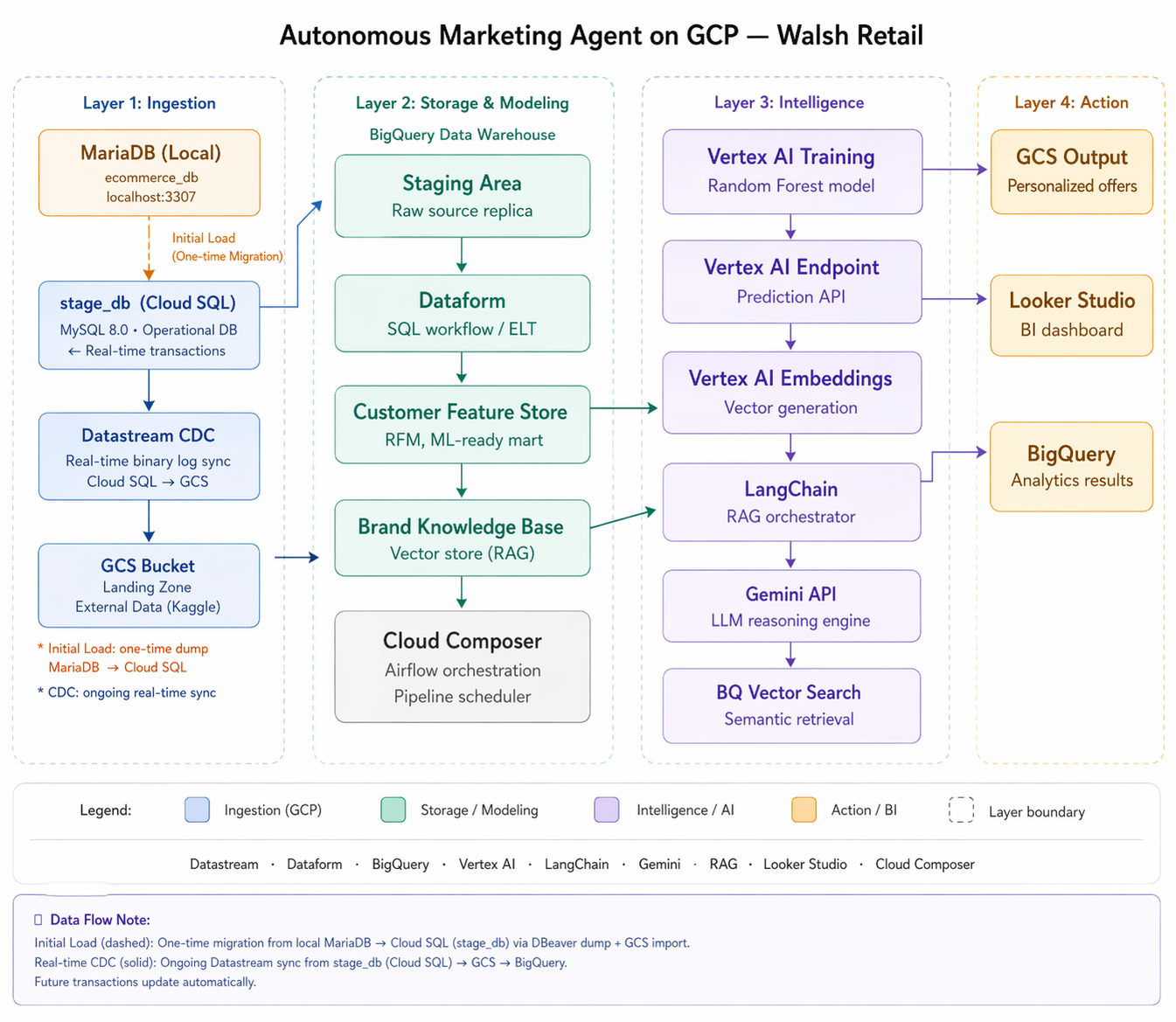
fig. Walsh Retail Autonomous Marketing Agent — 4-Layer GCP Architecture
Layer 1: Data Ingestion
Cloud SQL (MySQL 8.4) serves as the operational database — stage_db — migrated from the on-premises MariaDB system. Datastream CDC monitors the binary log and streams insert, update, and delete events to a GCS landing bucket in real time without impacting operational performance. External data (brand reviews) is loaded separately into the same GCS bucket for RAG processing.
Layer 2: Storage & Modeling
BigQuery hosts the ai_agent_db, organized into four datasets: mart, campaign, vector, and log. Dataform provides the SQL Workflow engine that transforms raw staged data into ML-ready feature tables. Cloud Composer (Airflow) orchestrates and schedules the full pipeline daily.
This layer embodies the OLTP-to-OLAP transformation pattern — converting normalized transactional records from stage_db into denormalized, analytics-ready tables for machine learning.
Layer 3: Intelligence & Orchestration
Vertex AI trains and hosts the Random Forest classification model. Vertex AI Embeddings converts brand review text into 1536-dimensional vectors. LangChain acts as the RAG orchestrator — retrieving relevant brand knowledge from BigQuery Vector Search and passing enriched context to Gemini API, which generates the final personalized offer.
Layer 4: Action & Visualization
Generated offers are saved as JSON in a GCS Output Bucket. Campaign KPIs are written to BigQuery. Looker Studio connects directly to BigQuery and renders the campaign dashboard — target segments, probabilities, recommended products, and offer messages — ready for marketing teams and executives.
Technology Stack Summary
| Layer | Component | Role |
|---|---|---|
| Ingestion | Cloud SQL MySQL 8.0 |
Operational DB — stage_db |
| Ingestion | Datastream CDC |
Real-time change data capture → GCS |
| Storage | BigQuery |
ai_agent_db — 4 datasets, 5+ tables |
| Storage | Dataform |
SQL Workflow — OLTP to OLAP transformation |
| Storage | Cloud Composer |
Airflow — pipeline orchestration & scheduling |
| Intelligence | Vertex AI |
Random Forest training + Prediction API |
| Intelligence | Vertex AI Embeddings |
Brand text → 1536-dim vectors |
| Intelligence | LangChain |
RAG orchestrator — Retrieval + Generation |
| Intelligence | Gemini API |
LLM — personalized offer message generation |
| Action | GCS Output Bucket |
Personalized offer JSON storage |
| Action | Looker Studio |
Campaign BI dashboard for business teams |
4. Database Design — OLTP to OLAP
A core design principle of this project is the clear separation between the operational database and the analytical database — mirroring the real-world architecture that enterprise data teams use to keep transactional systems stable while enabling ML workloads to scale independently.
4.1 stage_db — Design Process & ERD
The stage_db was not simply copied from the source system. It was designed through a structured 4-step analysis process — from data survey to normalized schema to final DML history augmentation. The result is a clean, analytics-ready staging database that serves as the single source of truth for the entire AI Agent pipeline.
Analyzing what data exists in the Walsh Retail operational system and what is actually needed for the marketing agent pipeline. A data survey identifies the meaningful signals and eliminates noise before any schema design begins.
Based on the survey, the following data domains were identified as essential: customer profiles, purchase transaction history, product catalog, and fulfillment data (address, payment). Data outside these domains was excluded from stage_db to keep the schema focused and maintainable.
The selected data domains were organized into a 3rd Normal Form (3NF) relational schema — eliminating redundancy, ensuring referential integrity, and optimizing for transactional workloads. The ERD was designed using Lucidchart ERD feature, and DDL scripts were generated and converted to MySQL-compatible syntax using Claude AI. Key design decisions:
- Customer is the central entity — all campaign targeting, RFM scoring, and offer generation flow through it
- address_info & payment_info separated from customer (3NF) — supports multiple addresses and payment methods per customer
- order_master + order_detail split — order_master is the primary RFM source; order_detail links to product/SKU for category analysis
- product_raw preserved as staging — raw Kaggle Flipkart CSV import kept for traceability; transformed into product table via ETL
The final step adds two standard DW history tracking columns to every table. These columns are essential for Datastream CDC — they allow the pipeline to track exactly what changed and when.
With Step 4 complete, the stage_db design is finalized. The 4-step process — Survey → Selection → 3NF Design → DML Augmentation — produces a staging database that is clean, traceable, and ready for real-time CDC streaming to BigQuery.
dml_flag CHAR(1) — I = Insert, U = Update, D = Deletedml_datetime DATETIME — DML occurrence timestamp (second precision). MIN = creation time, MAX = last modifieddml_flag + dml_datetime are sufficient to reconstruct full change history. dml_flag <> 'D' filters active records. No is_deleted or is_current flags needed.
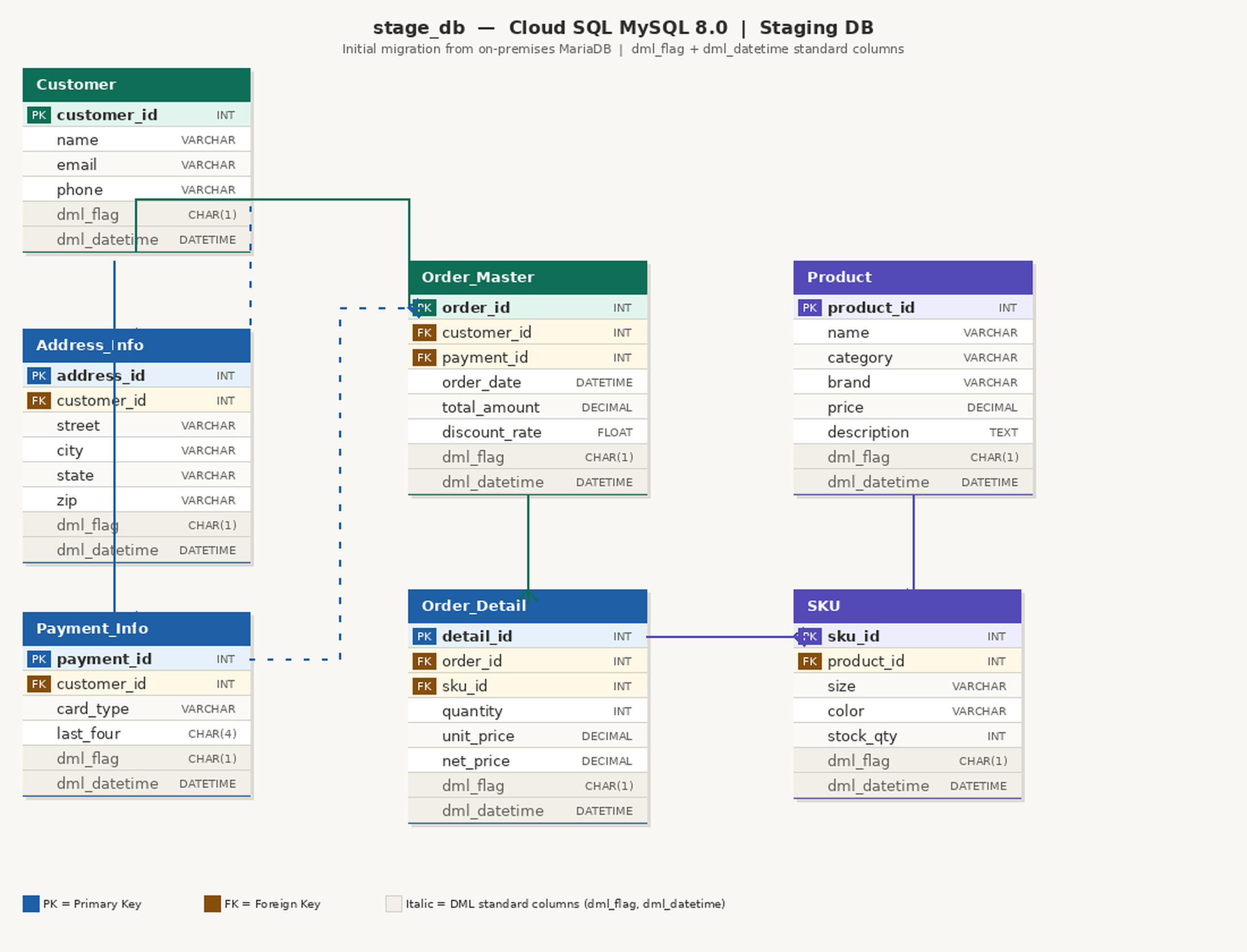
Figure. stage_db Entity-Relationship Diagram — Cloud SQL MySQL 8.4
| Table | Records | Description |
|---|---|---|
customer |
200 | Customer profiles — central entity |
address_info |
200 | Shipping addresses |
payment_info |
200 | Payment methods |
order_master |
1,163 | Order headers — customer, address, payment |
order_detail |
~5,000 | Order line items — order to product/SKU |
product |
2,000 | Product catalog — Kaggle Flipkart dataset |
sku |
~2,000 | Stock keeping units |
product_raw |
~10,000 | Raw Kaggle import — product staging |
4.2 ai_agent_db — AI Agent Analytical DB (BigQuery)
The ai_agent_db lives entirely in BigQuery, organized into four datasets. Data flows from stage_db via Datastream CDC and transforms through Dataform SQL Workflow into ML-ready tables.
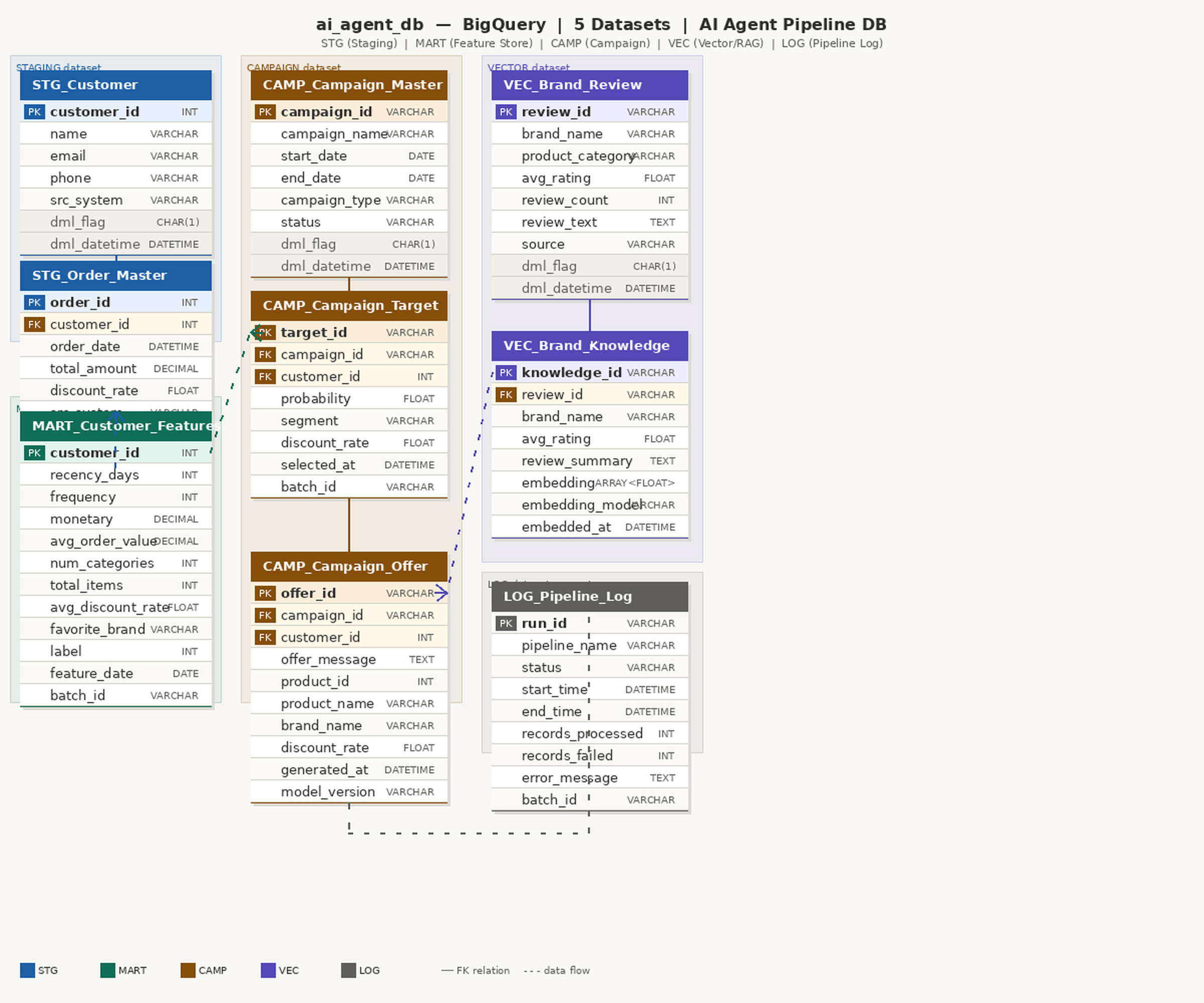
Figure. ai_agent_db Entity-Relationship Diagram — BigQuery
| Dataset | Tables | Role |
|---|---|---|
mart |
customer_features, ml_prediction | Feature Store for ML training + prediction results |
campaign |
master, target, offer | Campaign lifecycle — definition, targets, LLM offers |
vector |
brand_review, brand_knowledge | RAG Knowledge Base — brand embeddings (Phase 3) |
log |
pipeline_log | Airflow DAG execution history (Phase 3) |
Data Flow: Operational DB to Data Warehouse
The pipeline begins with the Operational DB (source system) and flows through stage_db (Cloud SQL) into the BigQuery Data Warehouse. Datastream CDC captures every change in real time — no batch jobs, no manual exports.

Figure. Data Flow — Operational DB to BI
5. GCP Environment Setup
The following steps were completed to set up the GCP environment. GCP Console was used for all configuration — screenshots show the key results at each step.
5.1 GCP Project Creation
A dedicated GCP project isupernova-ai was created to keep all Walsh Retail AI pipeline resources isolated from other projects. Using a dedicated project makes billing transparent and the portfolio self-contained.
Navigation: GCP Console top bar > Project dropdown > New Project > Enter name: isupernova-ai > Create

figure. GCP Project Create & select
5.2 Cloud SQL Instance (ai-db)
A Cloud SQL MySQL 8.0 instance named ai-db was created using the 30-day free trial (Enterprise Plus edition) — high-performance at no cost during the trial period. The free trial provides one instance per project lifetime.
Navigation: GCP Console > Menu > Cloud SQL > Get Started

Figure 5.2. Cloud SQL instance ai-db — MySQL 8.4, RUNNABLE
5.3 Connecting DBeaver to Cloud SQL
DBeaver is the industry-standard database GUI used by data engineers worldwide. There are two connection methods. The recommended approach is Cloud SQL Auth Proxy, which creates a secure encrypted tunnel without exposing the database to the public internet.
Auth Proxy (Recommended): Run in Cloud Shell, then connect DBeaver to 127.0.0.1:3306
Public IP (Not recommended): Connect directly to Cloud SQL Public IP on port 3306. Use only for temporary troubleshooting.
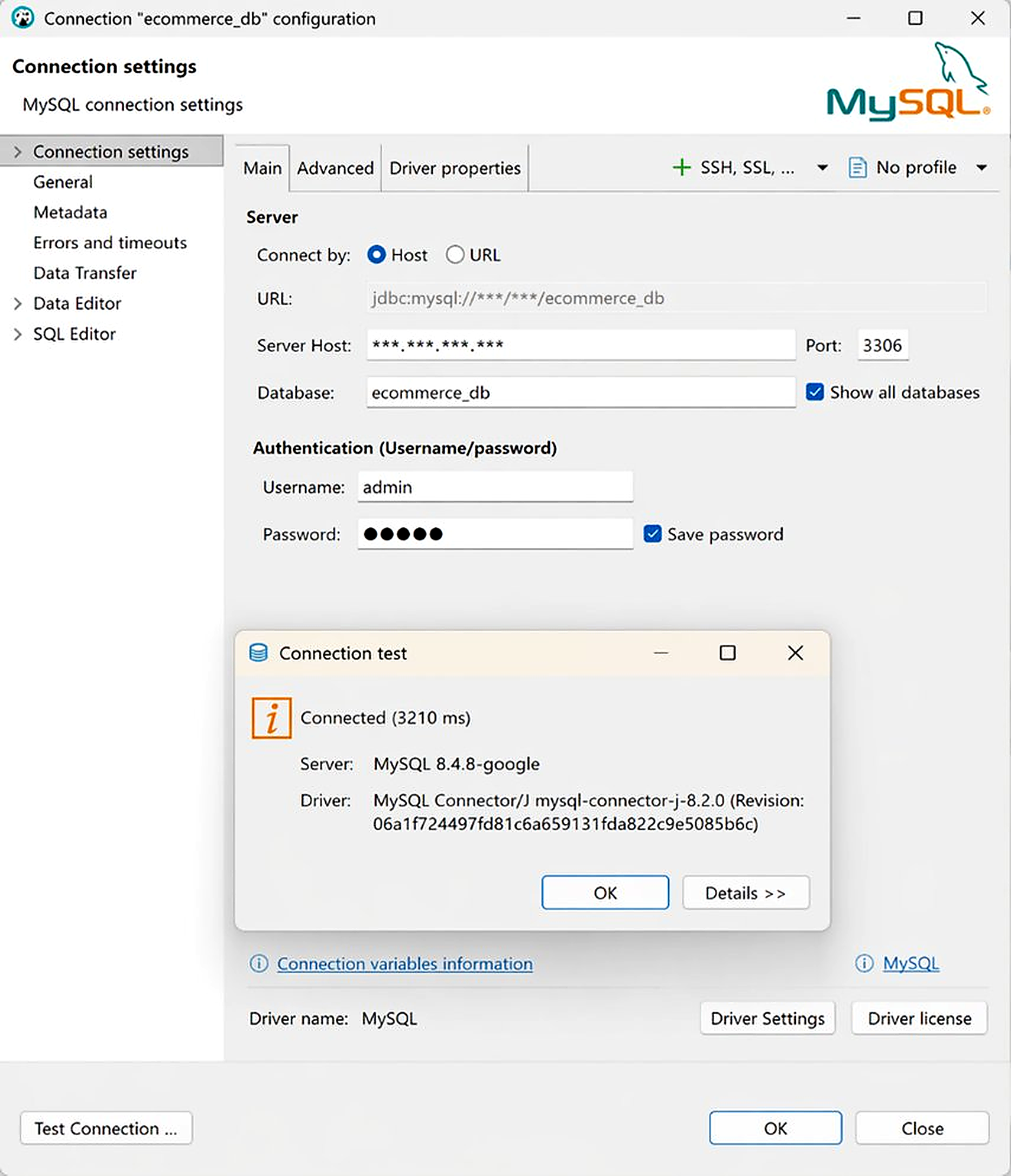
Figure. DBeaver — Connection test for data migration
5.4 Database Migration: MariaDB to Cloud SQL
The stage_db (8 tables) was migrated from local MariaDB (localhost:3307) to Cloud SQL using DBeaver dump and GCS import. The dump file required a minor compatibility fix for MariaDB-to-MySQL collation differences before import.
DBeaver: Right-click ecommerce_db (localhost:3307) > Tools > Dump Database > Choose objects to export (select all tables) > Export configuration > Start

Figure. DBeaver — Select tables for dump export example
After dump, upload the file to GCS Bucket via GCP Console:
Navigation: GCP Console > Cloud Storage > Buckets > isupernova-media > Upload files > select dump_ecommerce_db_fixed.sql
Using the Console: Navigate to Cloud Storage > Buckets, click the 'Upload Files' button, and select the file from your PC.
Drag and Drop: You can also drag and drop files from your local folder directly into the browser window.
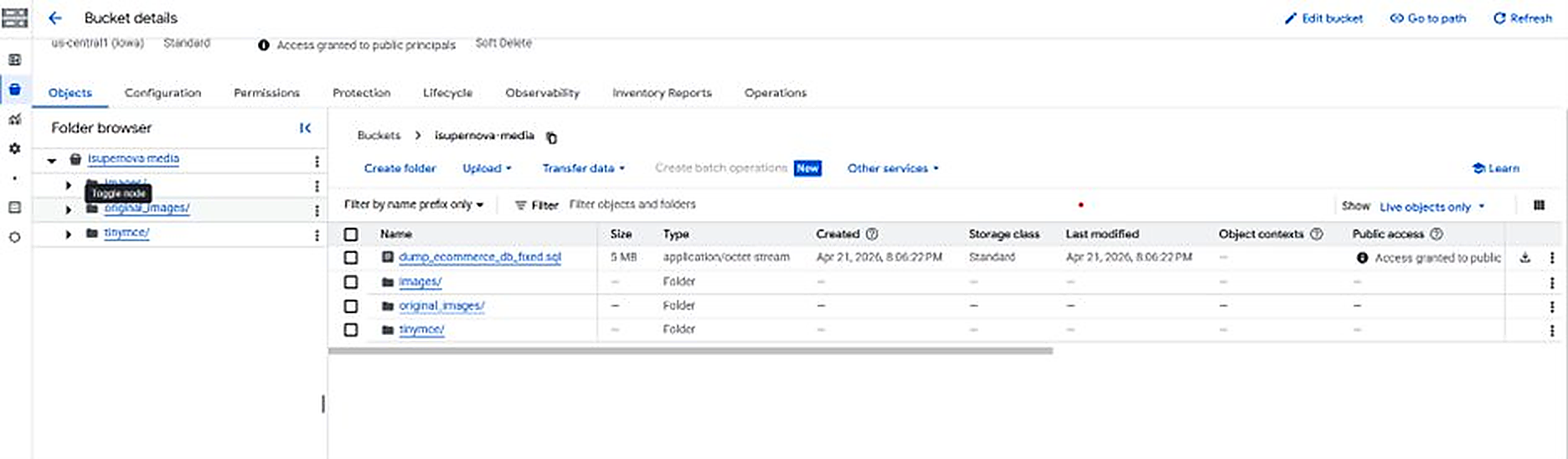
Figure. GCS Bucket — dump file uploaded via GCP Console
Once the dump file is uploaded to GCS, run the following command in Cloud Shell to import it into Cloud SQL:
gs://isupernova-media/dump_ecommerce_db_fixed.sql \
--database=ecommerce_db \
--project=isupernova-ai

Figure. Cloud SQL Studio — 8 tables successfully imported
5.5 Adding DML Standard Columns
After migration, dml_flag and dml_datetime were added to all 8 tables via ALTER TABLE. For the initial load, all records are set to dml_flag = 'I' (Insert) and dml_datetime = NOW() to record the migration timestamp.
ALTER TABLE customer
ADD COLUMN dml_flag CHAR(1) NOT NULL DEFAULT 'I',
ADD COLUMN dml_datetime DATETIME NOT NULL DEFAULT CURRENT_TIMESTAMP;
UPDATE customer SET dml_flag = 'I', dml_datetime = NOW();

Figure. DML standard columns added — dml_flag='I', dml_datetime=migration timestamp
6. BigQuery Schema — ai_agent_db
The ai_agent_db was created in BigQuery Studio — GCP's integrated environment with SQL editor, Gemini AI-assisted query generation, and direct Looker Studio connectivity. DDL scripts were generated from the ERD design and converted to MySQL-compatible syntax using Claude AI (Anthropic).
6.1 Creating Datasets
Four datasets were created in BigQuery to organize the pipeline layers. Each dataset represents a distinct functional layer with its own access control scope.
Navigation: BigQuery > Studio > Explorer panel > isupernova-ai > ⋮ (three dots) > Create dataset > Enter Dataset ID > Create dataset

Figure. BigQuery — 4 datasets created: mart, campaign, vector, log
6.2 Creating Tables (mart + campaign)
The mart and campaign datasets were created first as they are required for the ML training and campaign management phases. The vector and log datasets will be created in Part 3 when the RAG pipeline and Airflow orchestration are implemented.
BigQuery Studio's built-in Gemini AI feature was used to assist with SQL generation and query debugging — a practical demonstration of AI-assisted development in action.
Navigation: BigQuery > Studio > SQL Editor > paste DDL script > Run (or use Gemini Chat to generate SQL)

Figure. Gemini AI in BigQuery Studio — SQL generation from Gemini AI prompt
One of the most powerful features of BigQuery Studio is its native integration with Gemini 1.5 Flash/Pro. By clicking the Gemini icon in the SQL Editor or using the side-chat interface, you can generate complex queries using simple natural language.
For example, I used a prompt like: "Generate a DDL script to create the database, tables, and column structures for our retail data mart based on the provided schema." Gemini instantly provided accurate SQL code, significantly reducing the time spent on manual syntax checking and allowing me to focus on the high-level data architecture.

Figure. BigQuery — mart dataset: customer_features and ml_prediction tables created

Figure. BigQuery — campaign dataset: master, target, offer tables created
With the database layer complete — stage_db running on Cloud SQL, ai_agent_db schema in place on BigQuery, and the initial data loaded — all the foundations are now ready.
In the next post, we will set up the Data Pipeline (Datastream CDC + Dataform), prepare the RAG knowledge base, and build the predictive ML model. Stay tuned for Part 2.
Coming up in Part 2: Datastream CDC + Dataform + Cloud Composer
Real-time data pipeline from Cloud SQL to BigQuery — automated, monitored, and production-ready.
The sample data and source code for this project are available upon request. Feel free to reach out via the contact page.